How save works
THUG2 on PC keeps each save in one file: Save/newf.SKA, 88 KB, done. The port now
reads and writes exactly those files, so a save from a 2004 PC install loads as is, and the port's own saves look like
they came from 2004.
Save folder into the port and keep playing: same files, same format, same story progress, same custom skater.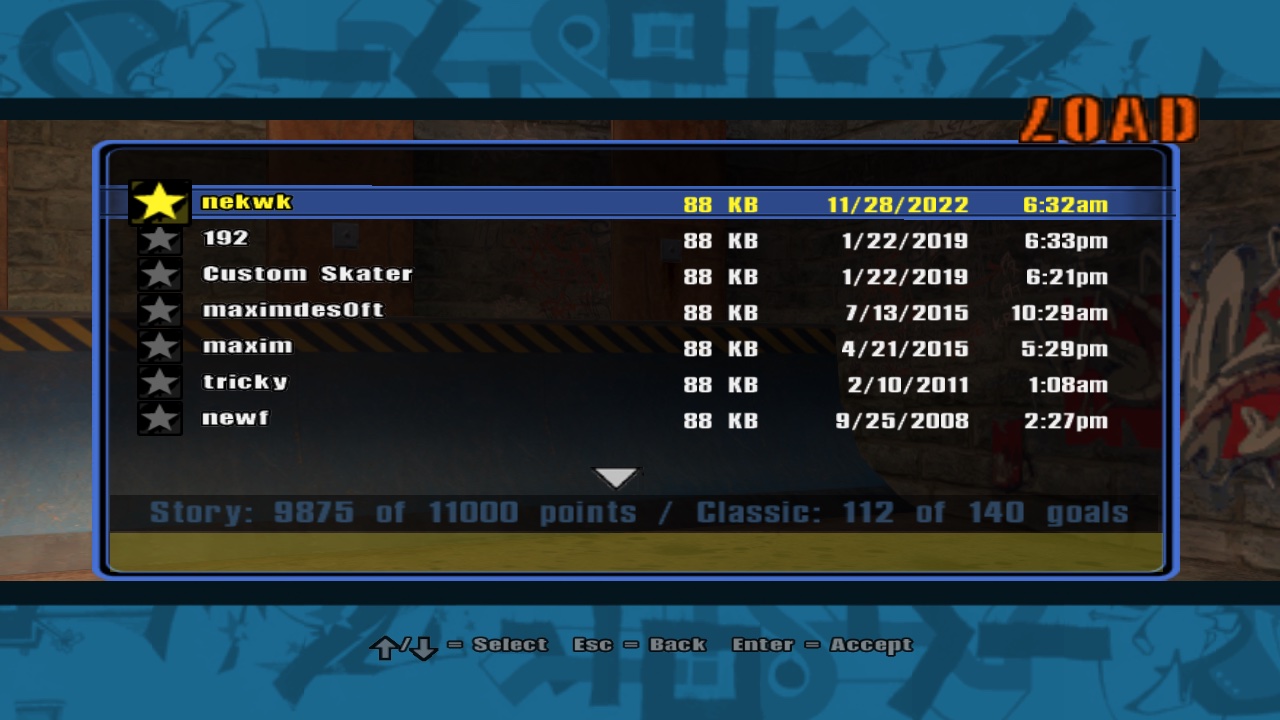
Game/Save, listed by THUG2's own Load menu. The line at the bottom is read from each file's summary, without loading the whole thing.1One file per save, extension says what it is
THUG2.exe builds the name with sprintf("Save/%s.SKA", name) and friends, one extension per save type.
The directory listing goes the other way: the extension tells the type.
| Extension | Save type | What's in it |
|---|---|---|
.SKA | OptionsAndPros | Story and classic progress, options, records, the pros, the custom skater, its graphic |
.PRK | Park | A created park |
.CAT | CAT | A created trick |
.GOA | CreatedGoals | Created goals |
.GRF | CreatedGraphic | A Create-A-Graphic |
.NWS | NetworkSettings | Online settings |
The port used to do it the Xbox way: a folder per save, a SaveMeta.txt with the name, an icon nobody
ever looked at. THUG2 PC never did any of that. Out it went.
2Inside a .SKA: THUG1's layout, with 32-bit sizes
A header, a small summary (what the files menu shows), the save itself, then 0x69 padding up to a
fixed size. It's the same layout the engine already wrote, with one catch: the header has two sizes declared as
size_t. On a 32-bit PC in 2004 that's 4 bytes. In a 64-bit port it's 8, and every offset after it moves.
The checksums are THUG1's too: a CRC of the header (with its own checksum field zeroed), the summary and the data.
All eight retail saves checked out with a 20 line Python script before any C++ was touched. The fixed size settles the
block size: SaveSize_OptionsAndPros is 90000, plus the 20 byte header, rounded up to 1 KB blocks, makes
90112. THUG2.exe's block size table agrees (1024 for the PC), and the files menu now says 88 KB like the original.
3Find the file, even when someone renamed it
The files menu loads a save by the name in its summary. One of the test saves was called Custom_Skater.SKA
with "Custom Skater" inside: renamed by hand at some point, because THUG2.exe never swaps spaces for underscores. THUG2
itself would look for Custom Skater.SKA and fail. The port tries the name first and then asks every file of that type
who it is:
Saving goes through the same lookup, so overwriting "Custom Skater" rewrites Custom_Skater.SKA instead of
growing a twin. File names are matched ignoring case: THUG2 itself left both .SKA and .ska behind.
4Save what THUG2 saves, where THUG2 saves it
Getting the file to open was the easy part. The first retail load crashed, because the data inside is shaped differently. THUG2.exe's save and load functions were read straight out of the disassembly, key by key:
| Where | THUG1 had | THUG2 has |
|---|---|---|
GoalManager_Params | points, cash, sponsor, team, chapter, pro status | only difficulty_levels |
Career | flags, gaps, visited levels, a theme | the same, plus story points per level, classic goals per level, their totals, currentChapter, highestChapter, classicStats |
StorySkater | tricks, stat goals, chapter status | also which chapter intro and outro movies were seen |
| top level | — | layer_infos: the custom skater's Create-A-Graphic |
The key names are CRC32 checksums, not text. A few were guessed by brute force from word lists
(careerTotalScorePotential came out of the blender on the first spin). Two are still nameless. They're saved
anyway, as raw numbers.
5Prove it: load, save, diff
A temporary command in the test hook calls SaveToMemoryCard. For each retail save: boot with only that
file in Save/ (the game autoloads the newest save), save it back under a new name, decode both files and
compare every field. The first run caught the chapter coming back as 0 (the story reset ran after the career had set it)
and a "valid" gap list with no gaps reading back as "never checked". After those fixes:
The only fields allowed to differ are the ones that should: the last level and game mode (the copies were saved from the main menu) and the file's own name.
6Know where your saves are
| Running | Saves | Settings |
|---|---|---|
./Game/THUG2, THUG2.exe, THUG2.x86_64 | Game/Save/ | Game/config.ini |
THUG2.app | ~/Library/Application Support/THUG2/Save/ | ~/Library/Application Support/THUG2/config.ini |
Back up a save by copying its file. The newest story/skater save loads automatically at start. A lowercase
save/ folder that's already there is used as well, for file systems that care about case.